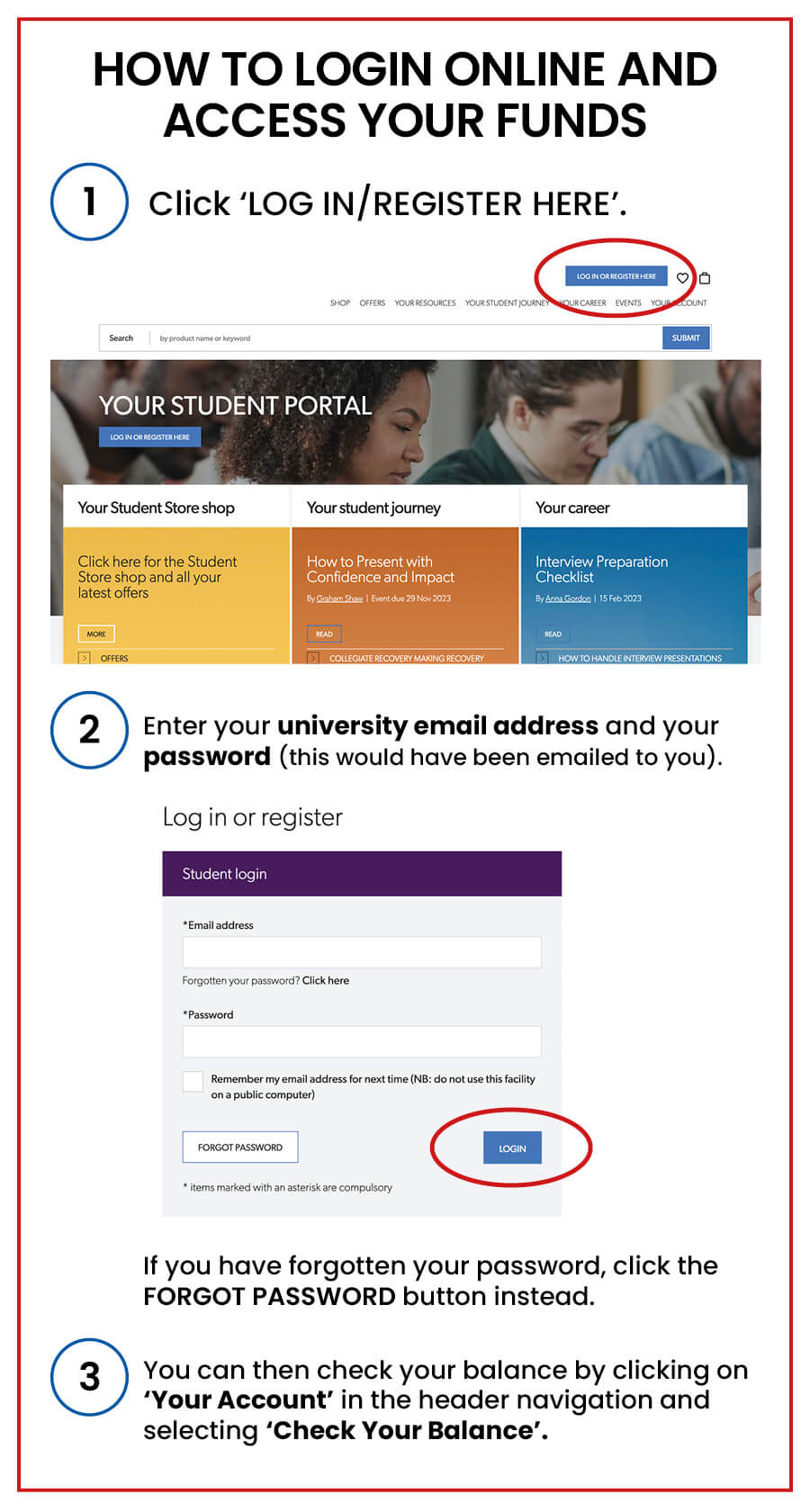
How to Login
To access your funds, you will need to login to your account by clicking here, or by clicking the 'Login or Register Here' button. Your account has already been set up for you, so you do not need to register.
Frequently Asked Questions
You do not need to register for an account with Essex Aspire as the account will be automatically set up, once the University has confirmed that a bursary is being awarded to you. You will then receive an email with the log-in details for your Aspire account.
When you login for the first time you will be prompted to change this to something more memorable and secure.
Please double check you are entering the correct username and password. If you can't remember your password - enter your university e-mail at login and press forgot password. A new password will then be sent out to you which you can then change. If you are still having trouble accessing your account, contact us at ku/oc/eripsa-xesse//ofni/tneduts.
You do not need to register or create an account on the Essex Aspire portal. If the university are providing you with funds, then an account will be created for you automatically when your funds are awarded and the login details will be sent to you. You also do not need to make an account to access the free online resources available on the portal.